Lesson 1-1: Basic HTML Tags and CSS Styles
What is HTML?
HTML stands for HyperText Markup Language and it is used to structure content on a webpage. Every web application is essentially a tree of HTML elements. Elements consist of opening and closing tags.

We can put elements inside of each other, or put them adjacent to one another. We refer to elements as part of a parent-child relationship, where the outer element is the parent, and the inner element is the child.
All HTML files include basic starter code, necessary to be ready for the web. The
<head><body>For the
<head><head><meta><title>Adding content in the <body> tag
<body>Using HTML elements: you can write an element in three steps...
- Create the opening tag: ex.
<p> - Create the closing tag: ex.
</p> - Put content inside: ex.
<p>Hello there!</p>
<h1><h6><h1><h6><h1><h2><p>Not all elements have an opening and closing tag, some are self-closing tags, where the tag doesn't have a seperate closing tag.
<img>Notice how the
<img />Attributes
All HTML elements can have attributes as they provide additional information about the element. Attributes must always be written in the opening tag and as name and value pairs:
name="value"<img>srcaltWhat is CSS?
CSS stands for Cascading StyleSheet and it is used to style the content of an HTML document and describes how HTML elements are to be displayed on screen.
In CSS, we target different HTML elements using selectors, and then define properties for that element.
A CSS rule-set consists of a selector and a declaration block:
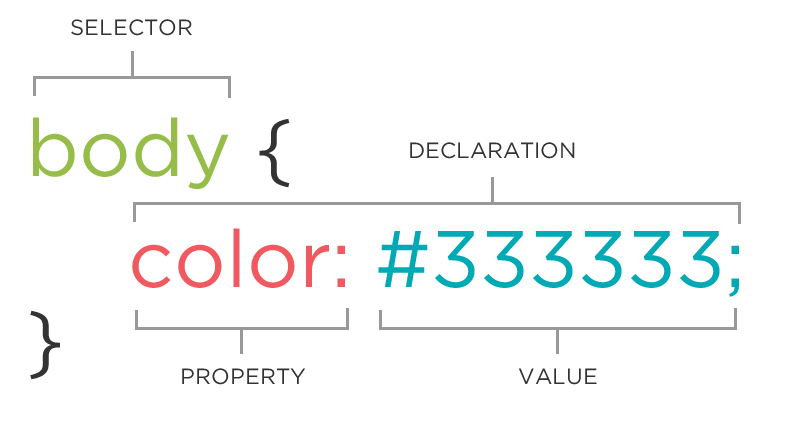
The selector points to the HTML element you want to style.
Properties are unique CSS rules within declarations that have a set of possible values. We define them within a declaration block, and add semicolons after each one.
Multiple CSS declarations are separated with semicolons, and declaration blocks are surrounded by curly braces.
Common CSS properties and their value
Three different areas to add CSS There are three different areas we can place our CSS styles.
- Inline CSS (Not Recommended) We can directly place CSS in the opening tag of HTML elements using the style attribute.
Inline CSS has highest precedence, meaning if you were to change the CSS value for that property in a different area, then that change would not display. Inline CSS is not recommended because content and design are mixed up, making your content hard to read and it lacks CSS reusability.
- Internal Stylesheets (Use sparingly, if at all)
We could also place all of our CSS in a element in HTML, which should be placed within the
<style>element of the HTML starter code.<head>
Internal stylesheets should be used sparingly because it is effective for styling a single HTML page, but if you have multiple pages, it is time-consuming and repetitive to paste the CSS on every single document.
- External Style Sheets (Highly Recommended)
We can create separate CSS stylesheets and import them into our HTML using the element, which should be placed within the
<link>tag.<head>
index.html
styles.css
External style sheets is highly recommended because it keeps the HTML and CSS code seperate and it is simple to link the same stylesheet into other web pages if they share the same styles.